
How to Build Your Own GTM Tools with Claude Code: Lessons from Matt Volm
Contributor
.png)
Matt Volm
Founder & CEO, Eventful and RevOps Co-op

Glenn
Organic Growth Manager @ TripleDart
In this article
Introduction
Every operator hits the same wall eventually. A report the CRM can't produce. A weekly meeting that asks the same questions it asked last week. A workflow that passes one document between four people before it reaches the website.
And the question that follows is always some version of "why doesn't our software just do this?" For years the options were to buy another tool, file a ticket with engineering, or keep doing the work by hand.
Claude Code has added another option. GTM teams now hear "just use AI" constantly, usually without anyone showing them what that looks like from the operator's chair.
Matt Volm, founder and CEO of Eventful and RevOps Co-op, takes a more careful view. Building has gotten easy. The hard part is deciding what to build and where AI gets to make the call. Every tool you build comes with trade-offs you own long after the build is done.
This playbook is based on Episode 19 of Coach by TripleDart, where Matt walked through three tools he built for his own teams: a live HubSpot pipeline dashboard, an AI deal review bot, and an automated content pipeline. For each one he covered how he started, what powers it, what it costs, and where it falls apart.
Matt has an accounting and finance background. He was VP of Business Operations at Ally.io before Microsoft acquired it, co-founded Funnel IQ, and built RevOps Co-op into a community of more than 20,000 operators. Today he runs Eventful, an event marketing platform for B2B GTM teams.
He doesn't write SQL. He doesn't write Python. Before Claude Code, he'd never even opened a terminal window.
Getting Claude Code running when you've never seen a terminal
The first thing Matt did with Claude Code was admit he had no idea what it was. He opened Claude Chat in a Chrome tab and told it exactly that: he didn't know what Claude Code was or how to get started, but he wanted to. Claude gave him the steps, one at a time.
That's his advice for anyone starting cold. Claude Code, as Matt describes it, is an agent that lives inside your terminal. You describe what you want in plain English. It writes the files, runs them, reads the errors, and repairs whatever broke.
The agent does the work end to end. "It truly feels kind of like a magical experience," Matt said.
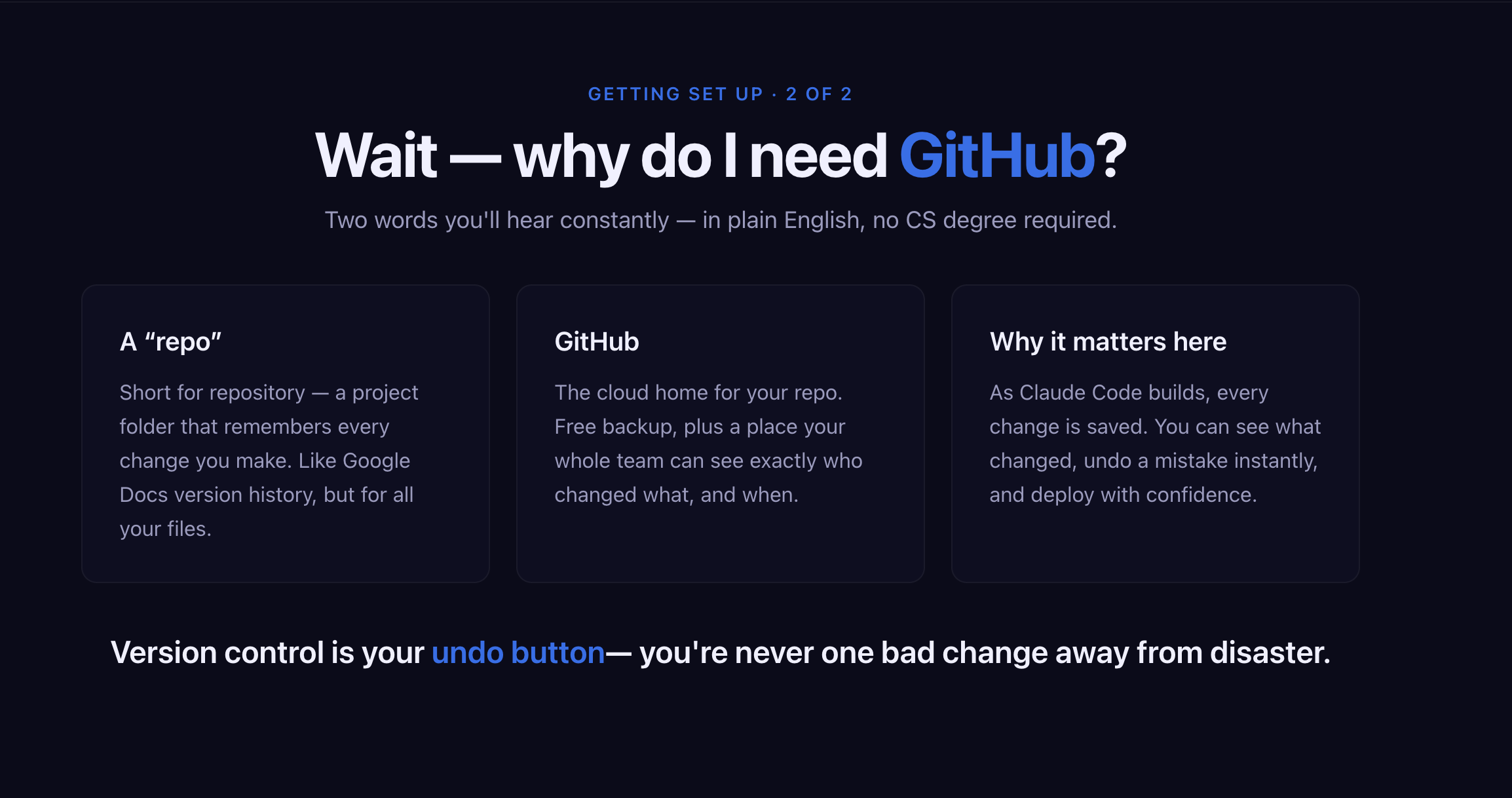
The one setup step he insists on is a free GitHub account. He'd heard the word "repo" for years without knowing it stood for repository. Think of a repo as a project folder with version history, the way a Google Doc keeps every past draft, except it covers every file behind your tool.
Without it, everything sits on your laptop, one accidental delete away from gone.
With Claude Code installed and GitHub backing up his work, Matt was ready to build. But he still solves a problem by hand first. Once he understands it, he decides whether it needs Claude Code or a plain deterministic workflow.
Claude Code sits alongside Claude Chat and Cowork. Joe Kurian, Co-founder and CPO of Slate, compared all three in Episode 13 of Coach by TripleDart.
Matt reaches for Claude Code only once the problem is clear.
While he built all three tools using AI, only two of them use AI once they're running.
Build 1: a live HubSpot pipeline dashboard with plain arithmetic underneath
RevOps Co-op runs on about five employees and a couple of contractors. Matt wears multiple hats. He's the CEO, he does sales, onboarding, and product, and he's the entire RevOps team.
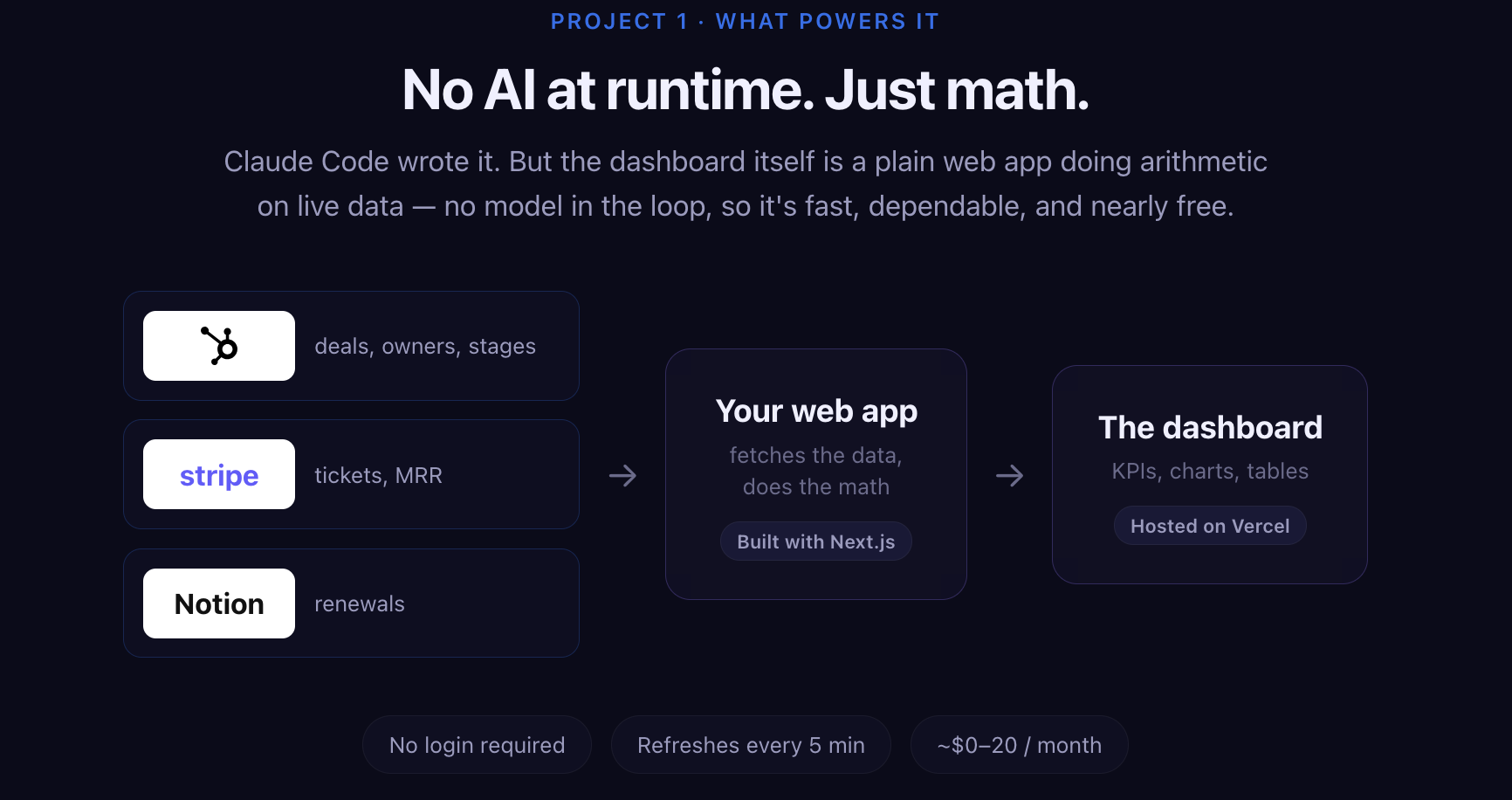
The numbers he needed day to day were split across three tools. HubSpot runs the CRM and marketing automation, so it holds the pipeline and deal data. Stripe handles payments, so it holds ticket sales and MRR. Notion tracks renewals.
"I don't know if anyone here has tried to build dashboards natively in HubSpot. But it takes a lot of time. And I could just never get to the thing that I really want to get to," Matt said.
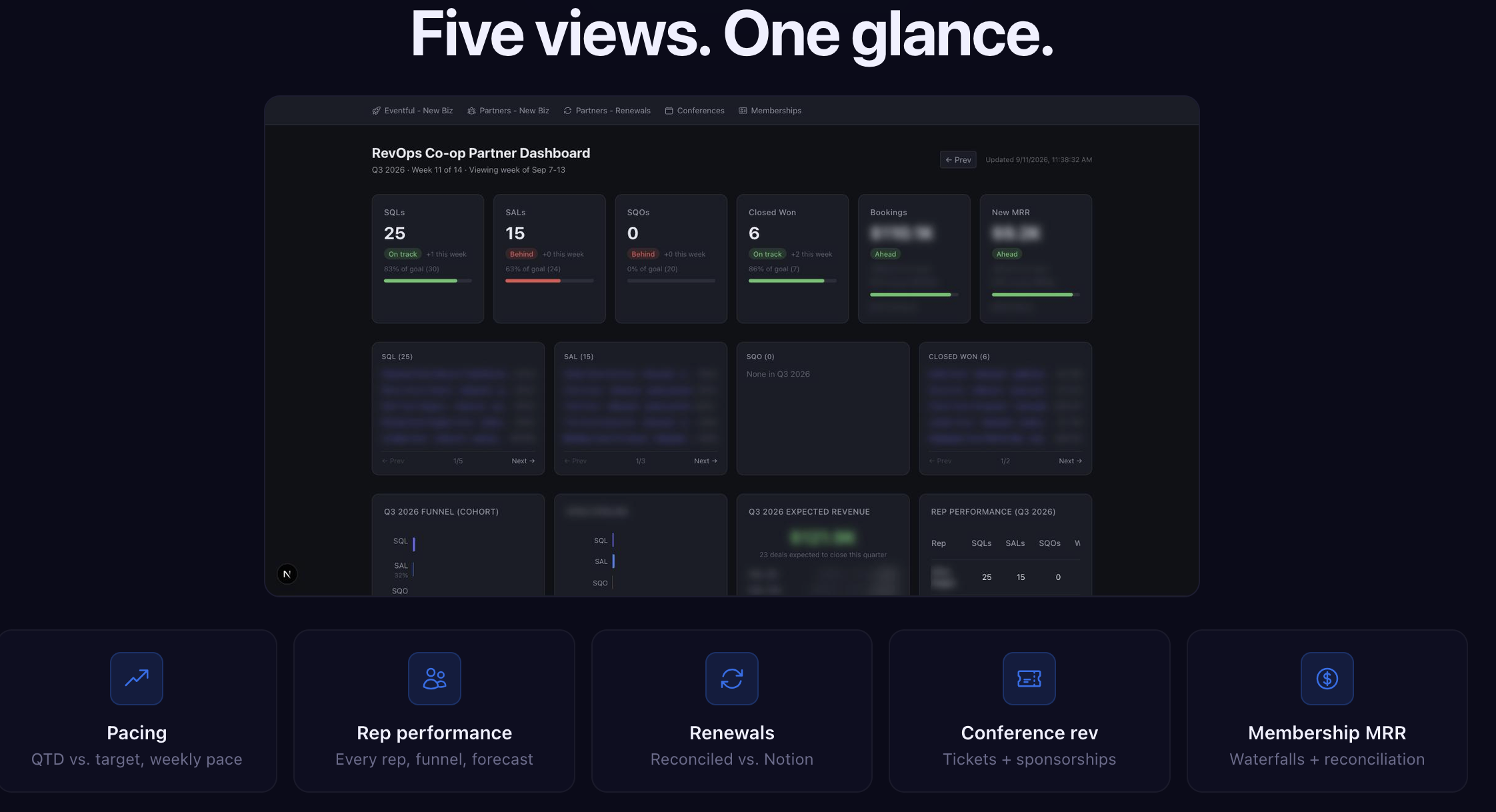
He wanted one place to see performance across every line of business, partnerships, renewals, conferences, and membership.
Starting with one view out of five
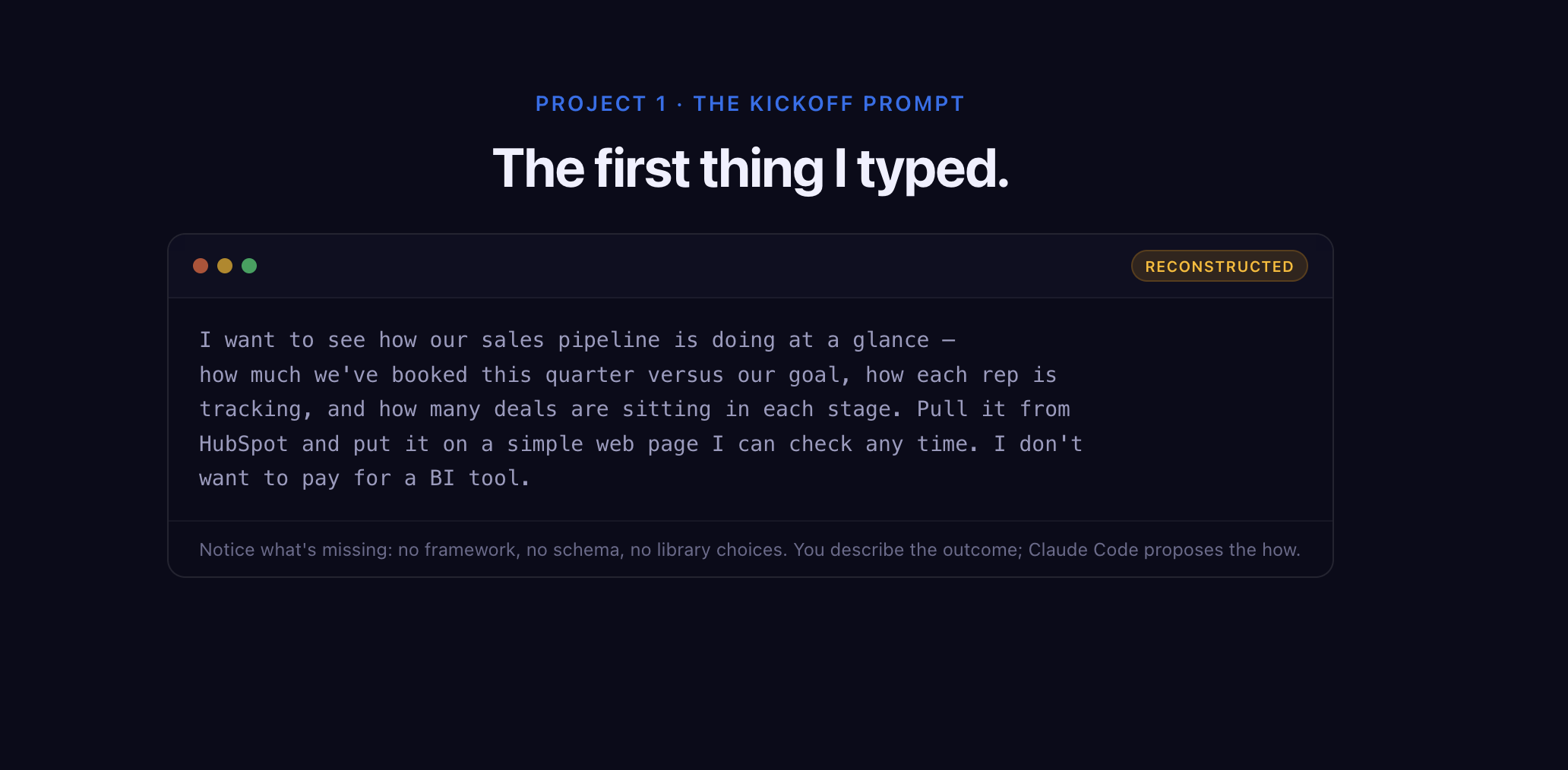
He kicked things off by telling Claude Code the problem and describing what he wanted to see. Then came the back-and-forth.
Don't expect to one-shot any of this. Treat it like brainstorming with a sharp colleague who needs pushback. If Claude recommends something you don't understand, ask why. Tell it to challenge your assumptions. There are no shortcuts here.
He had five views in mind. He built one. The partner dashboard came first because proving the pattern on a single view meant he could copy it to the other four. Narrowest slice first, then add depth, then connect more systems.
The partner view tracks sales qualified leads, sales accepted leads, sales qualified opportunities, closed-won deals, bookings, and new MRR.
These are his metrics for running his business. Yours will look different, and you can build around them.
What the dashboard runs on and what it costs
Claude Code wrote the dashboard, but once it's live, HubSpot and Stripe data flow in through their APIs to a Next.js web app, Notion data comes in alongside, and the app renders the KPIs, charts, and tables. It's hosted on Vercel and refreshes every five minutes.
The running cost is somewhere between $0 and $20 a month. Matt already pays for HubSpot, Stripe, and Notion, so pulling his own data out costs nothing extra.
The bigger saving was time spent on plumbing. Inside HubSpot he'd have been dragging charts around and associating object types. He'd also have had to work out how to match Stripe customers to HubSpot contacts when the billing email doesn't match the CRM email. He sorted all of it out in plain English.
Where the dashboard breaks
Matt is upfront that he took shortcuts, and he picked them on purpose.
There's no login. Security matters at any size, but for an internal view of his own numbers he accepted the risk.
Pipeline names and stage IDs are hard-coded. If RevOps Co-op restructures its CRM, renames stages, or adds new ones, that means a code change. Since Matt would be the one doing any restructuring anyway, he's fine owning that.
The dashboard also calls the live APIs on every load, with no data warehouse underneath. So he sees the current state of the business and nothing about how it changed over time. Teams that want trendlines usually end up building a proper marketing data system with storage underneath. Matt didn't need that, so he didn't build it.
Every route has trade-offs, he said. The dashboard just does math, though. His second build asks a model to make a judgment, and that changes what can go wrong.
Build 2: an AI deal review bot that scores the pipeline every Friday
Every Friday, Matt and his one salesperson sit down for deal review. Salespeople have happy ears. Matt admits he tends to sit at the pessimistic end. And week after week, he was asking the same questions and checking the same CRM fields.
He wanted better conversations and a neutral third party sitting somewhere between the rep's optimism and his own doubt.
So he described an idea to Claude Code: an AI CRO whose only job is reviewing every open deal in the CRM, checking specific things, scoring each deal red, yellow, or green, and posting feedback to the team in a weekly Slack digest.

How the bot scores a deal
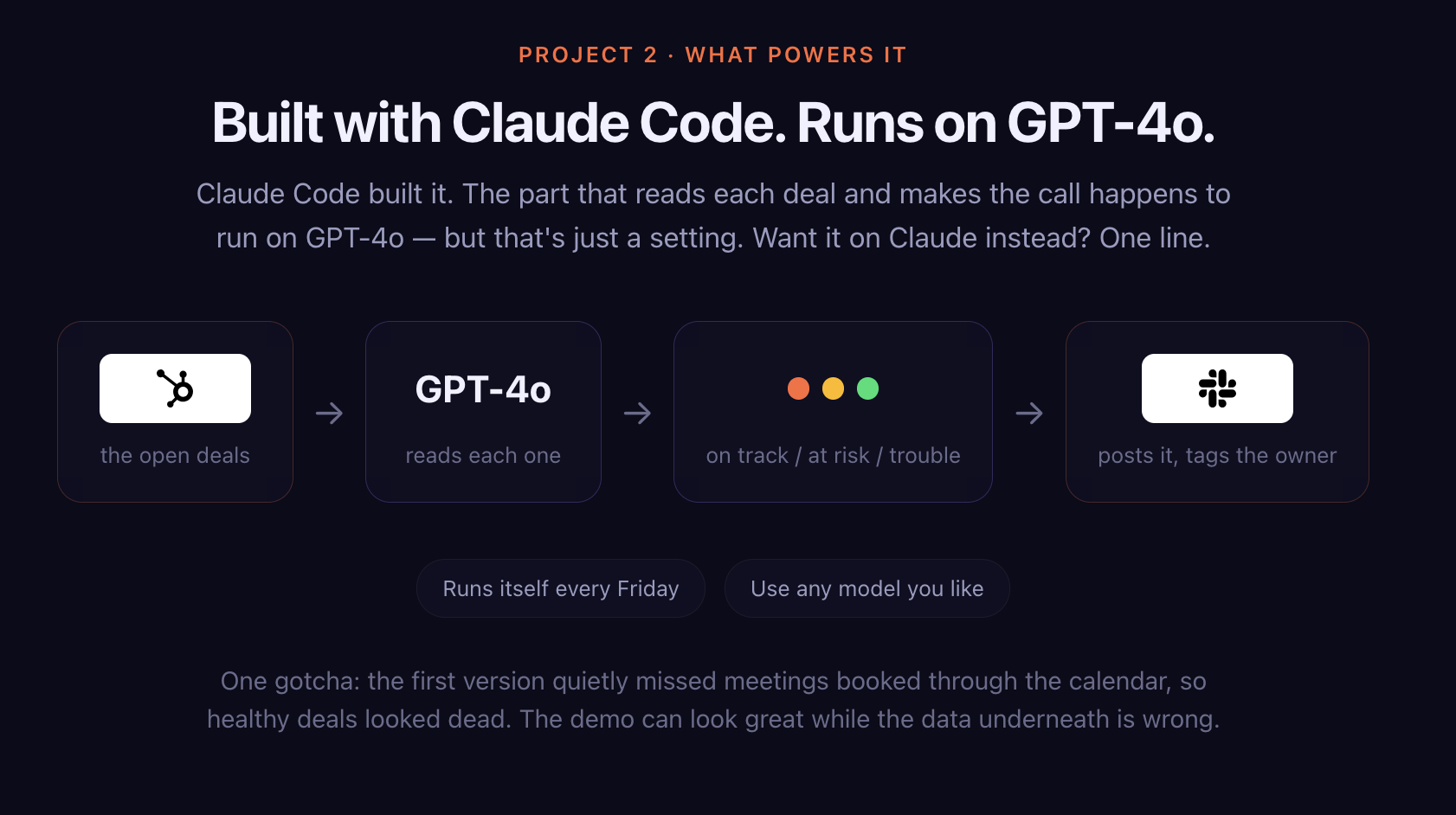
A cron job runs every Friday. The script pulls open deals from HubSpot and sends each one to a model, which decides whether the deal is on track, at risk, or in trouble. Then it posts a templated digest in Slack and tags each deal's owner.
The bot runs on GPT-4o, but that's just a setting. You can use any model you like and send the digest to Teams or email instead of Slack.
He kept the scoring to three colors on purpose. You can get fancier, he said, but simple is the right place to start. Pipeline review is one of the easier entry points into AI-native RevOps for exactly that reason: the inputs already sit in your CRM and the output is a short list.
Why it works at 30 deals and breaks at 300
Matt treats each score as directional. It's the bot's opinion, and he expects it to change from one Friday to the next.
The design has a ceiling, too. The bot makes one model call per deal, in a loop. RevOps Co-op has around 30 open deals at any time, so that's fine. A bigger sales team would find it slow and expensive, and would need a different setup.
Then there's data quality. "Garbage in just means confident garbage out," Matt said.
The first version had a quieter data problem, too. It missed meetings booked through the calendar, so healthy deals looked dead. A bot can look great in a demo while the data underneath is wrong.
But the bot also pushes the team toward cleaner data. It reads the next-steps property on every deal, and if that field is blank or vague, the bot calls the owner out in Slack. Want a yellow or green score? Write specific, actionable next steps.
The bot replaced the weekly meeting. The conversations about deal health still happen. Matt's one warning applies well beyond this bot: put alerts for everything into Slack and people stop paying attention. If the manager skips the digest, the team will too.
Build 3: an automated content pipeline built on a content brain
Matt has little patience for people who spot an em dash and declare a post AI-written, as if catching it were a sport. AI can write garbage. So can humans. Either way, you don't want to publish trash.
RevOps Co-op runs webinars and a weekly podcast, and every session gets a written write-up. The library onrevopscoop.com covers six years of sessions, each with the video and the full write-up.
For a couple of years, someone downloaded the transcript from Zoom. A person cleaned it up. A second person wrote the write-up, despite not being on the session. A third reviewed it. A fourth copied and pasted everything into Webflow.
Said out loud, Matt points out, the inefficiency is obvious. But the answer had to protect the voice that made the content worth reading.
Building the style guide from six years of write-ups
RevOps Co-op writes with a specific personality: snarky, sarcastic, full of corny dad jokes. That voice already lived in years of published write-ups. Matt's move was to mine it.
He pulled the public sitemap, downloaded a markdown version of every past write-up, and fed them to Claude, grouped by content type. Blog posts, podcast write-ups, and webinar write-ups each got their own pair of documents.
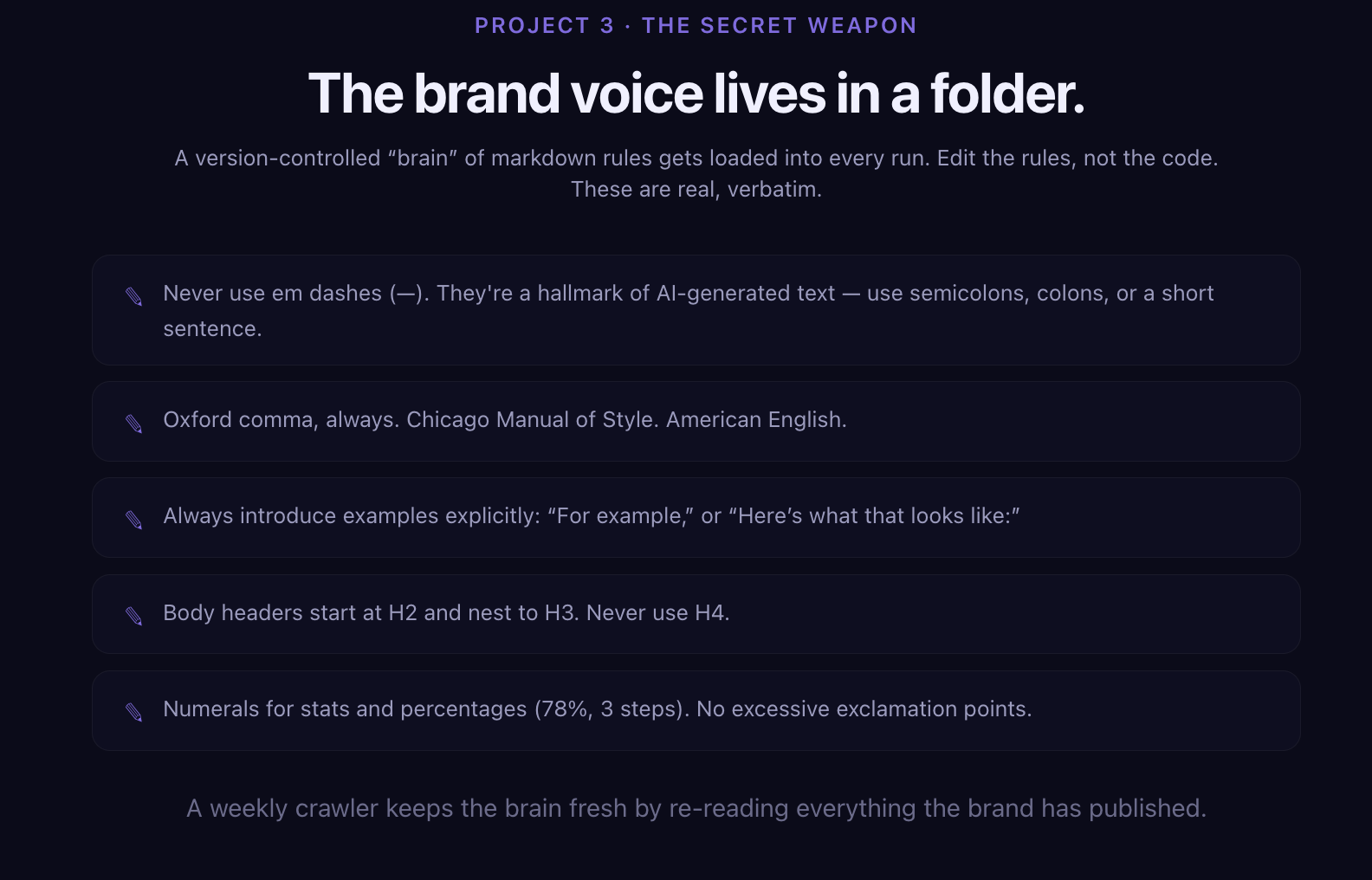
The first is a style guide covering how RevOps Co-op writes and what the tone sounds like. The second is a set of editorial rules, the AP-versus-Chicago calls like whether the Oxford comma stays. Together, Matt calls them the content brain. Fittingly, one of its rules bans em dashes outright.
More than half of the build was fine-tuning, and it's still a living system that gets adjusted.
From a Notion button to a Webflow draft
Now, someone drops the transcript into a Notion page, along with speaker details and LinkedIn profiles. They hit a button in Notion. That pushes everything to Claude, which checks the style guide and editorial rules for that content type and writes first drafts of seven assets from the one session.
The drafts land back in Notion and go straight into Webflow unpublished. Nothing auto-publishes. A person reviews each one, makes edits, and hits publish.

Guardrails took some learning. Early drafts attributed quotes to Matt that he knows he never said. So the rules now tell Claude plainly: don't invent quotes, don't make up stats.
It works because a transcript is a quality starting point. Matt is clear that the pipeline can't conjure a good post from nothing.
That rule holds well beyond webinar write-ups. Strong input plus human review applies whether you're building agentic SEO workflows or a full AI-native SEO engine.
Closing the loop
The last piece is what keeps the content brain current. Every week, a job crawls the public sitemap and pulls any newly published write-ups, which by then include the human edits. Claude reviews them and checks whether the style guide or editorial rules need updating.
So the team's edits teach the system. Matt's general advice for any AI workflow is to build this kind of closed loop wherever you can.
The old process ran on contractors billing by the hour, adding up to thousands of dollars a month. Now it costs, in Matt's words, pennies and dimes.
Teams that want the same pattern without building it can look at a content automation platform. Matt built his on top of an archive he already had, and that archive did most of the heavy lifting.
The costs you own after a Claude Code build
Security is on you. Anything you hard-code into the configuration is on you. And LLMs aren't deterministic. Ask different models the same question, or ask one model the same question on different days, and you'll get different answers.
The big one is maintenance. Anything your company starts relying on needs an owner. People will want features, things will break, and requests will keep coming. Sharing a build starts the work, and Matt warns against assuming it'll stay the way you left it.
That's why he recommends starting with the safest possible connection to your data. In HubSpot, that means a private app with read-only scopes. A read-only tool can look at your CRM but can't overwrite or delete anything. Add write permissions and you open the door to the kind of oops that wipes a field across hundreds of records.
Some teams decide they'd rather not carry that ownership in-house and hand the build to a GTM engineering team instead. Others build the capability internally, the way TripleDart is rebuilding itself as a growth engineering org. Either way, someone owns it.
The ownership cost turns out to be the best filter for the question every operator eventually asks: should I build this at all?
Build vs. buy: deciding what Claude Code should build
"Just because it's easier to build stuff on your own right now doesn't mean that you should," Matt said when Glenn asked how to decide between building and buying.
Start with the problem, he said. Then ask what's unique about it.
His example is a dialer. Say cold calling has become an effective part of your outbound motion and you want your team making more calls. You could build a dialer. But nothing about your business needs a special one. You have phone numbers and you need to call them, and the technology is the same for every company. Buy it.
Coach's earlier session on AI-first outbound goes deeper onthat motion if cold calling is part of your mix.
Now picture a product that ingests your CRM data, runs it through an AI black box, and hands back signals and GTM recommendations. Your team's actions will depend on what that system says. You can't see how the insight gets generated or how your data is used. Matt argues that's the layer worth owning yourself.
The dialer follows deterministic rules and you just need its output. The insight layer shapes decisions, so a human shoul down it and be able to explain it. It's the same judgment-versus-arithmetic question Matt answered in his own builds, and it's central to using AI in GTM strategy without handing over the steering wheel.
If you're weighing purchases, the next-gen GTM tools episode of Coach is a good companion to this one.
Your first Claude Code build this week
Matt closed with three ideas you can try in the next few days. Build a dashboard around a single number or a single product line. Or set up a weekly digest bot or a Slack alert for something you've wanted in front of your team.
Or write a script that turns content you already have, like webinar notes, into a better starting point for LinkedIn posts.
The trigger to look for, in his experience, is copy-pasting. If you regularly move information from one tool or spreadsheet to another, that's a strong first candidate, especially when Zapier can't quite handle it.
His own first automation was exactly that. RevOps Co-op needed page analytics out of Google Analytics and into Notion tables that varied by partner. He automated it away, and from there, he said, his mind went a little nuts with ideas.
Six to nine months after he started, he's pushing features into production for Eventful and closing out bugs customers report, on a product that's live in the market. He couldn't have imagined doing that himself when he began.
The possibilities can feel endless, and Matt admits that's intimidating. His answer is to set aside the time, then get as narrow as you possibly can. If writing code feels like too big a first step, Corey Haines' session on Claude skills for marketing is a lighter on-ramp, and TripleDart's free marketing tools show what small, single-purpose builds look like.
Audience Q&A
The Q&A pulled out a few details about how these tools hold up once other people depend on them.
On knowing when a prototype has earned its keep: If a tool your team is meant to use breaks and weeks go by before anyone notices, it probably wasn't that useful. If it breaks and Slack lights up, or people start sending feature requests, you've built something valuable, and that's when it's worth weighing a proper platform or a purchase.
On going from single player to multiplayer: Building for yourself is easy. Going from one user to two is where it gets hard. He built his webinar deck in code on a company subdomain so it could use his brand kit. When a teammate needed to own another deck, the questions piled up fast, starting with how to stop anyone from overwriting the brand guide.
On using Claude Code outside work: Matt coaches his kids' baseball teams in Wisconsin, where the rec league sends coaches a pile of PDFs. He built a website for each team with a snack sign-up sheet, a roster without email addresses, and automatic calendar invites for the whole schedule. The parents were stunned. All Matt needed was a robot and about 30 minutes.
Conclusion
The change Matt describes is about who gets to build. An operator with an accounting background now runs his business on tools he described in plain English.
The skill that separates a useful build from a maintenance burden is old-fashioned operations judgment: understanding the problem, starting with the smallest version, letting arithmetic do arithmetic, and keeping a human on anything that makes a call or speaks in your voice.
Key actions to take immediately:
· Ask Claude Chat to walk you through installing Claude Code, step by step, before you read a single tutorial.
· Create a free GitHub account and push every project to a repo so you always have an undo button.
· Solve your chosen problem by hand once before you build, so you know exactly what the tool needs to do.
· Pick the narrowest useful slice, such as one dashboard view or one product line, and prove it before you expand.
· Connect your CRM through a HubSpot private app with read-only scopes until you're confident enough to allow writes.
· Use plain API calls and math wherever the answer is arithmetic, and save model calls for steps that need judgment.
· Treat AI scores as directional and AI drafts as drafts, with a human reviewing every word that gets published.
· Write explicit guardrails into any content prompt, starting with no invented quotes and no made-up stats.
· Name an owner for every tool your team starts relying on, and plan for the feature requests that follow.
· Before building, ask whether the problem is unique to your business; if it isn't, buy the tool and save the build for your insight layer.
If you'd rather have a team own this kind of GTM build for you, you can talk to TripleDart. To keep going with Matt, follow him on LinkedIn, join the free tier of the RevOps Co-op community, or browse his deck, Build Your Own GTM Tools with Claude Code.
Watch the full video here: EP19: Build Your Own GTM Tools with Claude Code